Structured data through JSON-LD
Learn how to add and validate structured data on your Framer site using JSON-LD.
Structured data helps search engines better understand your page content by providing information in a standardized format. For example, a recipe page can define ingredients, cooking time, and calorie count in a way that search engines can easily interpret. Google Search Central recommends using structured data to improve content comprehension and categorization.
Add structured data to your site
Before adding structured data, identify the most appropriate schema type for your content. Resources such as Understanding how structured data works and the Search Gallery can help you choose the correct format.
On Framer sites, you can add structured data using the Custom Code feature. JSON-LD is the recommended format and should be placed inside a <script type="application/ld+json"> tag in the <head> section of your site.
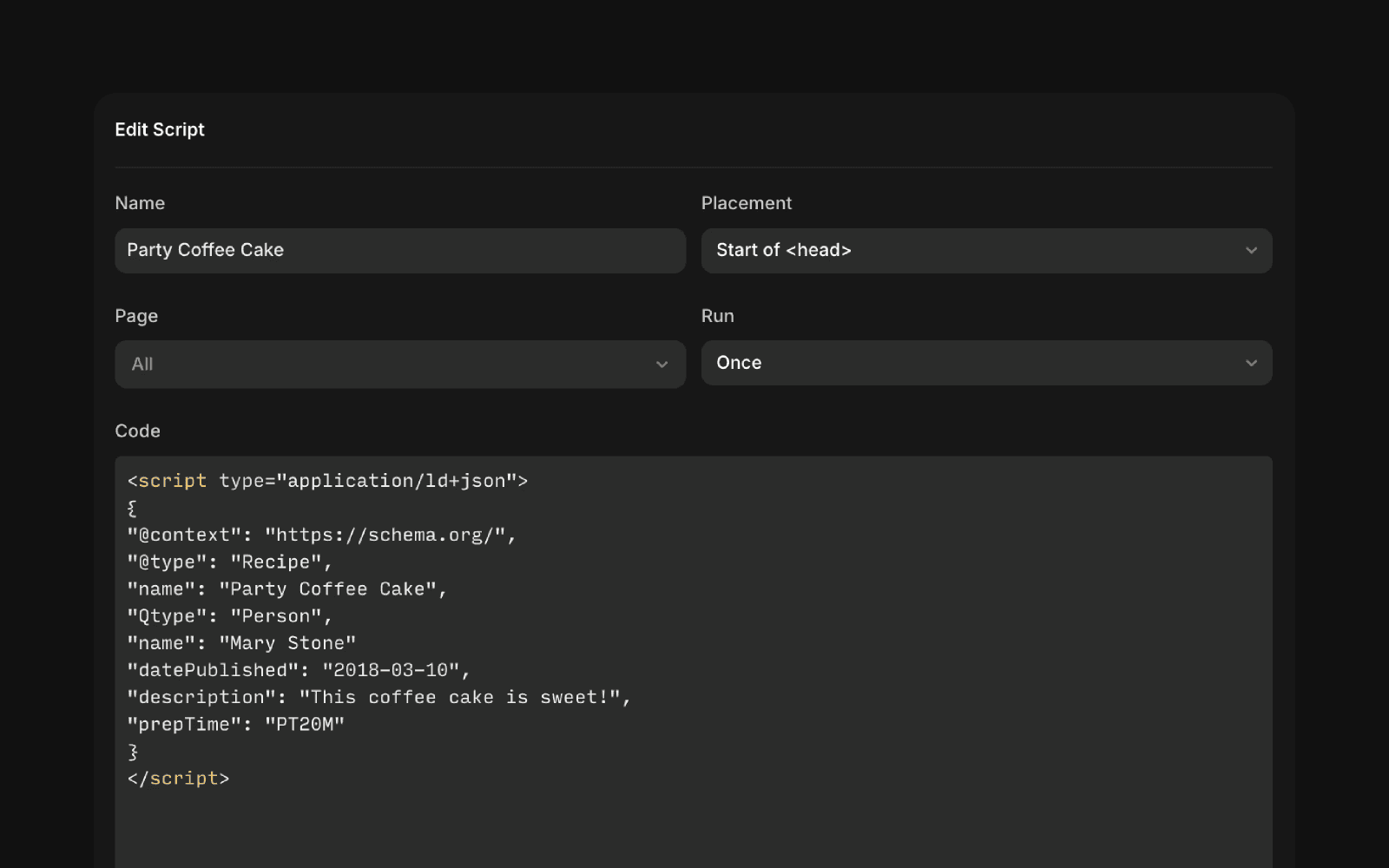
Add structured data to CMS pages
You can also use the Custom Code feature to add structured data to CMS detail pages. By referencing CMS fields with the {{}} syntax, you can generate unique structured data for each page.
For example:
{{Title}}references the CMS Title field.{{Title | json}}ensures the value is formatted safely for JSON output.
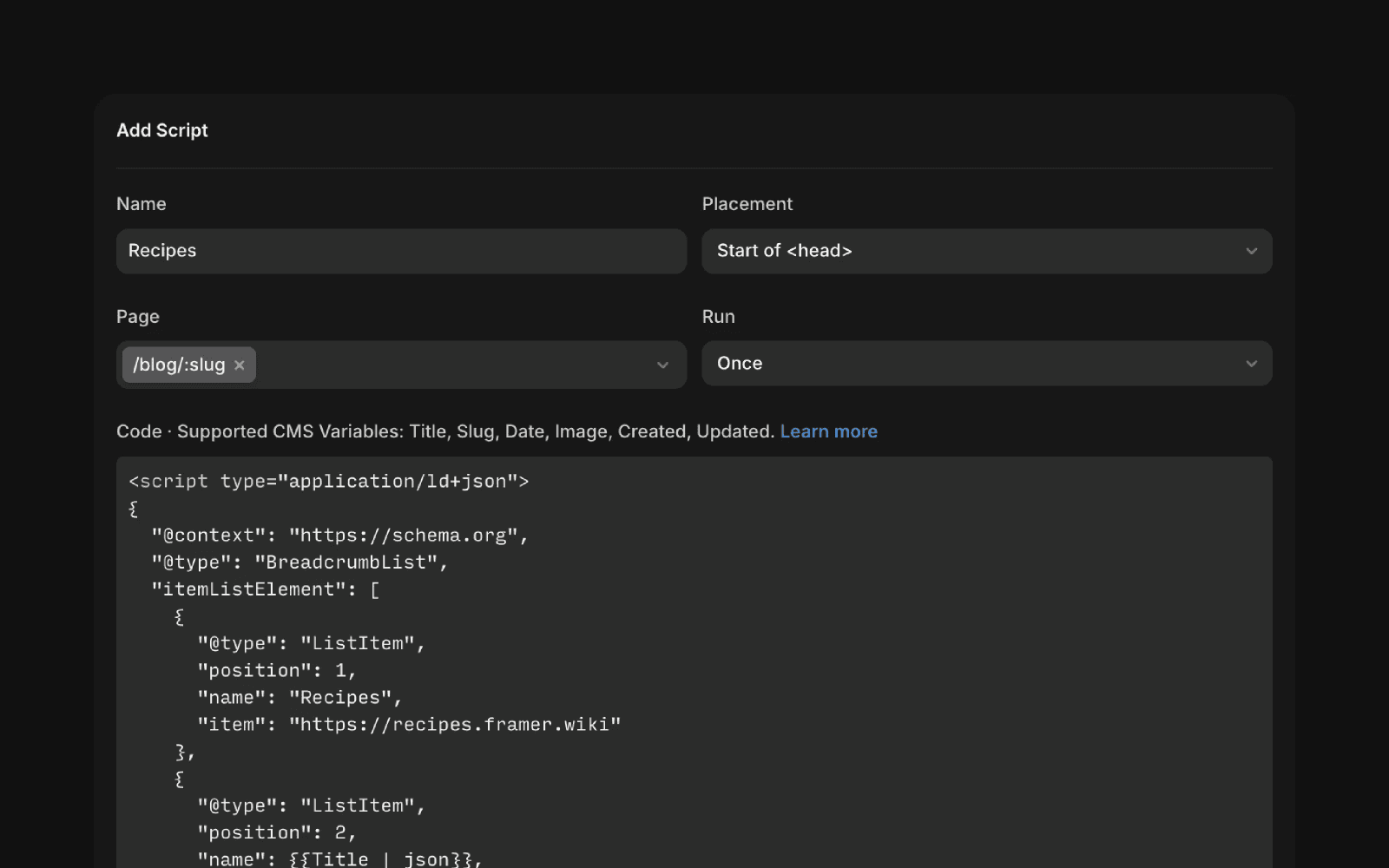
After publishing, inspect your live site to confirm that variables such as {{Title | json}} are correctly rendered for each page.
Store schema in a CMS text field
While dynamically generating schema with CMS variables is recommended, you can also store complete JSON-LD markup in a plain text CMS field.
To output this field in the <head>, use:
The {{variable_name | unsafeRaw}} filter outputs the stored content without modification. This approach is useful when you want full control over the JSON-LD markup directly within the CMS.
Warning: Use unsafeRaw carefully. It does not escape content. Invalid HTML or malformed JSON can break your site or introduce security risks.
Validate structured data
After publishing your site, validate your structured data using Google’s Rich Results Test. This tool confirms whether your schema is correctly implemented and eligible for enhanced search results.
Test specific schema types, such as breadcrumbs or recipes, to ensure they function as expected.
How can I add structured data like JSON-LD to my Framer website?
On Framer sites, use the Custom Code feature to embed structured data such as JSON-LD. You can add your JSON-LD markup directly using this feature to enhance your site's SEO and enable rich results.
How do I add unique structured data to each CMS page in Framer?
You can use the Custom Code feature on CMS detail pages and insert CMS variables using the {{}} syntax. For example, {{Title}} references the CMS 'Title' field, and {{Title | json}} ensures JSON-safe formatting. This allows you to generate unique structured data for every page.
What is the safest way to store and output schema markup from a CMS field in Framer?
You can write schema markup as JSON in a plain text CMS field and output it in the <head> tag using the syntax: <script type="application/ld+json">{{variable_name | unsafeRaw}}</script>. Be cautious with unsafeRaw, as it does not escape the content—invalid HTML or unsafe input can break your website or introduce security issues.
Updated