How to self host using a reverse proxy
Reverse proxy hosting is a modern way to integrate your Framer site with an existing hosting provider or infrastructure. It offers full control over headers, authentication, and delivery. Popular platforms like Vercel, Netlify, NGINX, Cloudflare, and AWS support this hosting method.
Framer offers Advanced Hosting, which lets you use reverse proxy functionality directly within Framer—without relying on third-party hosting tools or infrastructure. Advanced Hosting is ideal if you want reverse proxy capabilities with a fully managed Framer setup.
Advanced Hosting is currently an Enterprise only feature, with a closed beta signup for Pro and Scale plans.
You can also use reverse proxy hosting to integrate a Framer site with your own existing hosting provider or infrastructure. This approach gives you full control over headers, authentication, delivery, and more; while keeping Framer as the content origin.
Reverse proxy hosting is available as an add-on with the Scale plan and is included with Enterprise plans.
How reverse proxy hosting works
With reverse proxy hosting, your server requests pages directly from your Framer site and serves them to visitors. This removes the need to download and upload files after every update.
Your hosting platform forwards a visitor’s request to the Framer site, applies any custom logic you’ve configured, caches the response, and serves it to the client. Future requests are typically served from the cache, improving performance and reliability.
This setup gives you more control over how your site is delivered, while Framer continues to manage the content.
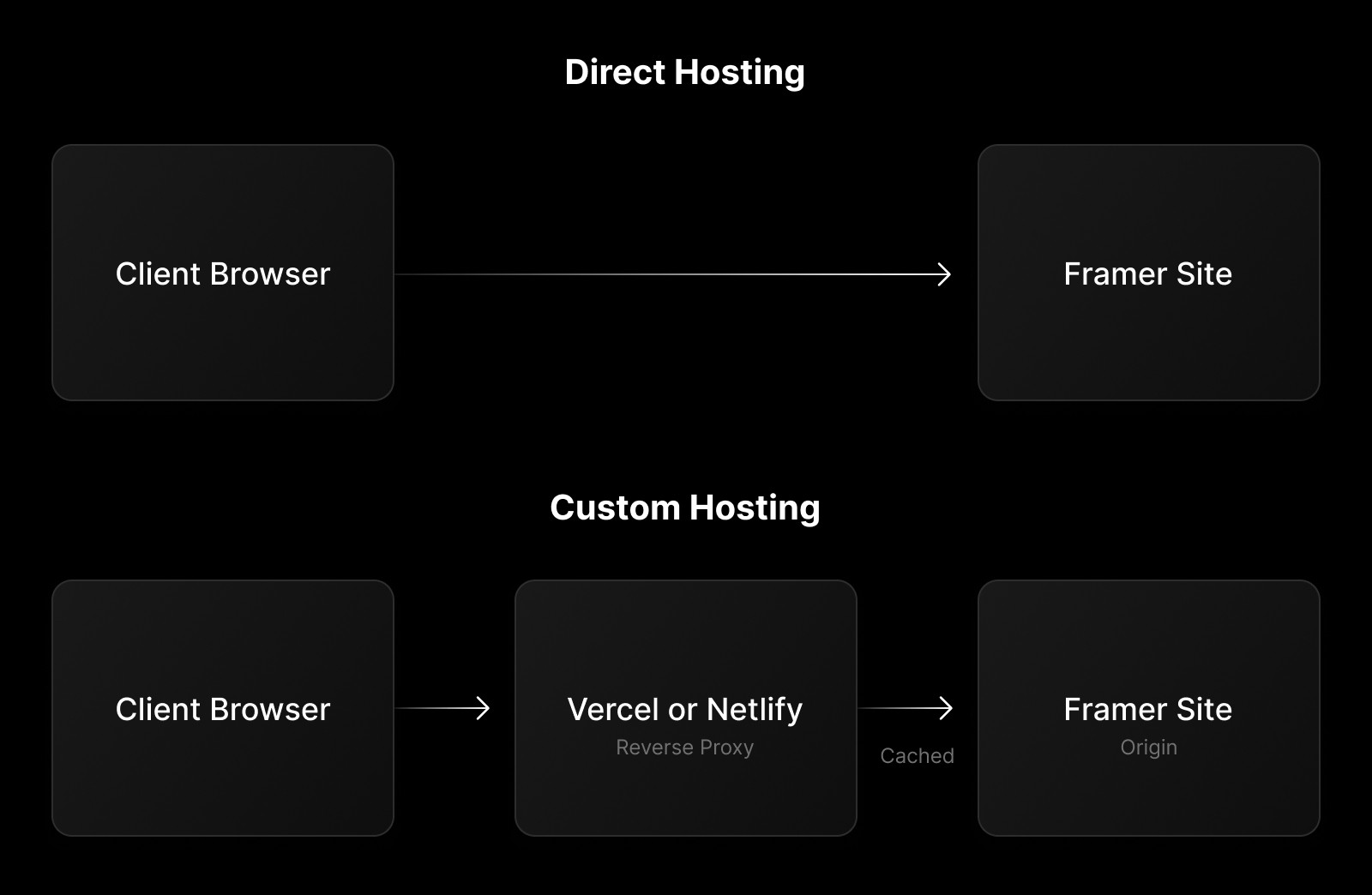
What you can do with reverse proxy
Reverse proxy hosting enables advanced setups, including:
Custom routing to host multiple sites on a single domain.
A custom CDN for localized performance improvements.
A custom WAF for security management.
Edge functions for authentication, analytics, or request handling.
Common use cases
Customers typically use reverse proxy hosting to:
Consolidate multiple websites under one domain using path-based routing.
Add authentication, analytics, or cookies before requests reach Framer.
Create a server-side analytics or optimization layer.
Add an additional caching layer for performance and reliability.
Route traffic through approved enterprise infrastructure.
Unsupported use cases
Framer doesn’t support reverse proxy setups that:
Modify or remove tags in
<head>. Some<head>tags are managed by Framer’s JavaScript. Changing or removing them can cause unpredictable behavior or break future updates. Adding tags is supported.Add, modify, or remove content inside
<div id="main">. This element contains the site’s React-managed content. Changes here can break the site. Modifying<body>outside of<div id="main">is supported, as long as Framer scripts remain unchanged.
How to set it up
Any platform that supports reverse proxies can be used. We provide step-by-step guides for common providers:
Best practices
For staging and production setups:
Use a free Framer domain such as
example.framer.websiteas the origin.Point your reverse proxy to this domain instead of connecting Framer directly to your main domain. This ensures end-to-end SSL, since Framer requires full domain control to generate certificates.
Set the “Canonical URL” in your site’s General settings so HTML metadata and the sitemap are generated correctly.
When using subpaths, align your Framer project paths with your proxy routes. For example, if
example.com/products/*is served by Framer, your Framer pages should use/products/<page>paths.Prevent trailing slashes in URLs. Framer’s client-side routing expects consistent paths, and trailing slashes like
/pricing/can break navigation or create duplicate paths.
Custom CSP configuration
Be cautious when using a custom Content Security Policy. A strict or incomplete CSP can break site functionality. We recommend avoiding a custom CSP unless you’re familiar with its implications.
If you proceed:
Allowlist all required Framer domains.
Include
worker-src 'self' blob:so the anti-bot system can run during form submissions.Test thoroughly in a staging environment before deploying to production.
What is reverse proxy hosting in Framer and how does it work?
Reverse proxy hosting allows your server to directly request and cache pages from your Framer site, eliminating the need for manual uploads after updates. You can modify the pages—such as setting headers or adding authentication—before serving them through your host. The hosting platform forwards client requests to the Framer site, applies modifications, caches the response locally, and serves subsequent requests directly from the host. This process simplifies updates and gives you greater control over your website.
What are some common use cases and best practices for using a reverse proxy with Framer?
Customers often use proxy hosting to consolidate multiple websites under one domain, add authentication, analytics, or cookies to requests, create a layer for server-side analytics or optimizations, add an extra caching layer for enhanced reliability and performance, and route traffic through vetted enterprise infrastructure. For staging environments, use a free custom domain like mysite.framer.website and point the proxy to this domain instead of linking your Framer site to your main domain. Set the 'Canonical URL' in your site’s general settings and align Framer project paths with the proxy setup when using subpaths.
What limitations or unsupported use cases should I be aware of when using a reverse proxy with Framer?
Framer doesn’t support reverse proxies that modify or remove tags in <head>, as these are managed by Framer’s JavaScript and changes may cause unpredictable behavior or break future updates. Adding tags is supported. You also cannot add, modify, or remove content in <div id="main">, as this tag contains the site’s content controlled by React. Modifications to this tag can break the site. Changes to <body> outside <div id="main"> are supported, provided Framer scripts remain unaltered.
Updated