

Benjamin
5:46
Use the index variable in Framer CMS lists
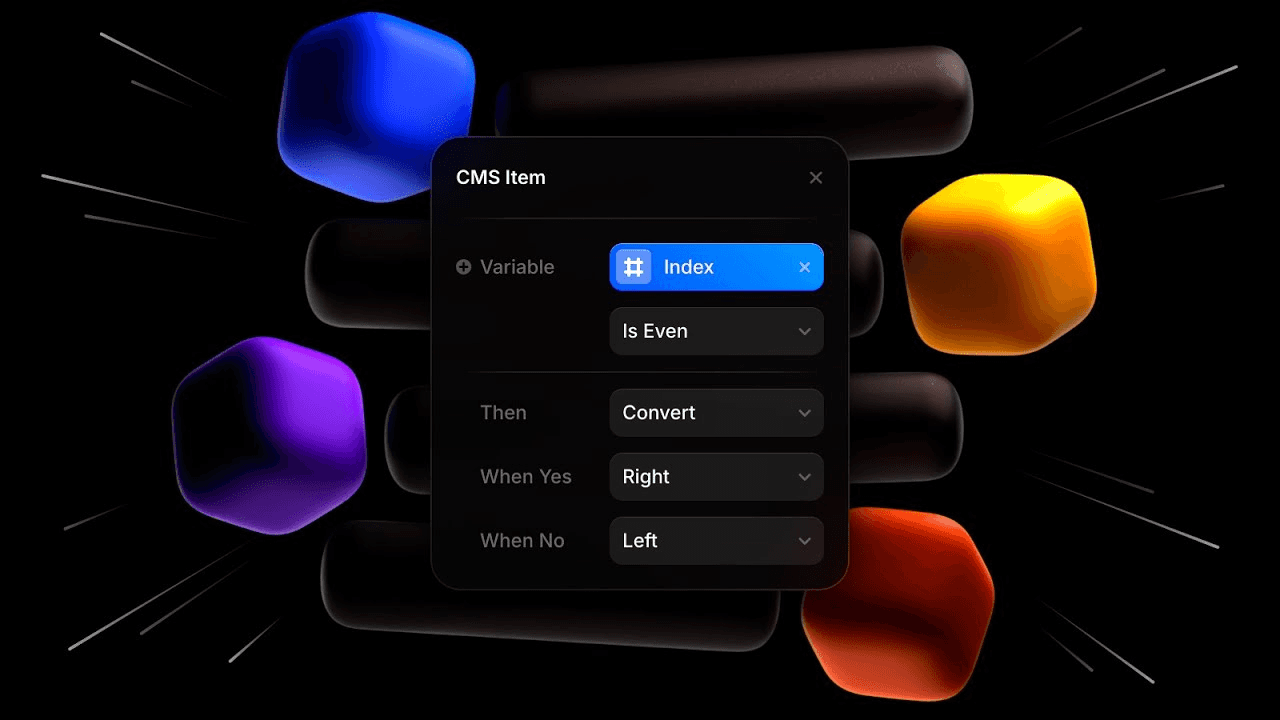
Learn how to use the index variable in Framer CMS lists. you’ll learn how to enable powerful new layout possibilities using advanced grid and conditional styling techniques with the Index Variable. You will work with CMS fields, collection items, or collection lists while keeping the content editable in Framer.
Lesson details
Use the index variable inside a CMS collection list to identify each repeated item’s position. Bind it to visible numbering or use it to vary an approved property when the design needs a predictable first, second, or alternating treatment.
Remember that filtering, sorting, and pagination can change the displayed index. Test the list with real content and avoid using position as a permanent identifier for CMS records.
Use stable fields for content and let the page template handle presentation. That separation makes bulk updates safer and keeps every CMS item consistent with the same design rules.
Frequently asked questions
How do I use the index variable in Framer CMS lists?
Learn how to use the index variable in Framer CMS lists. you’ll learn how to enable powerful new layout possibilities using advanced grid and conditional styling techniques with the Index Variable. You will work with CMS fields, collection items, or collection lists while keeping the content editable in Framer.
What does this lesson cover?
The lesson covers the settings and steps used to use the index variable in Framer CMS lists. See CMS Index Variable. Follow the demonstrated order in your project and review each change on the canvas before moving to the next step.
Does this workflow keep CMS content editable?
Yes. The workflow uses Framer CMS fields, items, references, or collection lists rather than flattening the content into a static page. Review the field mapping and each affected item after the change so editors can keep managing the content from the CMS.
Will CMS changes update collection pages?
CMS-backed collection lists and detail pages use the values stored in their connected fields. A field or item change can therefore appear wherever that content is bound. Review the list page, detail page, references, filters, and empty states after completing the workflow.
What should I review after I use the index variable in Framer CMS lists?
Review the exact pages and elements changed by the workflow. Confirm that copy, links, accessibility, responsive behavior, and interaction states still work as intended. Use preview for the final check and keep publishing separate from editing so you can fix problems before visitors see the update.
Continue watching
Load more